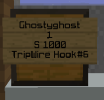
->place a single/double chest
->place a sign on the chest
->then skip a line using enter (this step enters your name automatically)
->Enter the amount you want to sell/buy at once
->Use S[value] for setting a price for the item you are buying from others/ B[value] for setting a price for the item you are selling to others
->then enter the shop name of the item (use the command /iteminfo while holding the item to get the shop name)
Also use /iteminfo for any item in hand.
Note :- The item name and shop name can be different e.g. Skull Item:3#1S must be written as Skul item:3#1S (single L )
It no longer work for me to create shop in this new ssnl/update follow the steps 1. Place single/double chest 2. Put a sign and type [shop] and click on done it will make a shop when u right click the sign it will open a GUI and u can select the item and set the price
It no longer work for me to create shop in this new ssnl/update follow the steps 1. Place single/double chest 2. Put a sign and type [shop] and click on done it will make a shop when u right click the sign it will open a GUI and u can select the item and set the price
This site uses cookies to help personalise content, tailor your experience and to keep you logged in if you register.
By continuing to use this site, you are consenting to our use of cookies.