

- Joined
- Dec 11, 2025
- Messages
- 1,032
- Points
- 115
- IGN
- Zxpril
Hey everyone!
I’ve been working on a custom PikaNetwork BedWars texture pack for some time now, and I think it has finally reached the stage where it is ready to be released.
This pack is intended purely for PikaNetwork BedWars and is designed to give max PvP and FPS performance to allow you to play at your very best, while still having a good-looking game.
NOTE: This is a completely unofficial pack!
Version: 1.8.9

Thanks for checking it out!
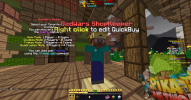
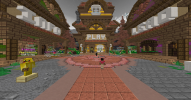
I’ve been working on a custom PikaNetwork BedWars texture pack for some time now, and I think it has finally reached the stage where it is ready to be released.
This pack is intended purely for PikaNetwork BedWars and is designed to give max PvP and FPS performance to allow you to play at your very best, while still having a good-looking game.
NOTE: This is a completely unofficial pack!
Main Features
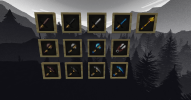
- Silverfish Snowball - Pokéball
- Ender Pearl - Ender-Pokéball (ender pearl colors)
- Fireball - Electro Ball
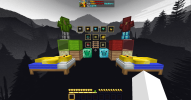
- Bed texture - A Pikachu is now sleeping in every bed
- Slapper (KB Stick) - Pikachu electric baton
- Diamond/Emerald Blocks - Pikachu head in the middle (matches the block color, so gens stand out)
- Armor upgrade detail - Enchanted armor shows the Protection level number on the chestplate
- All resources reworked - Iron, Gold, Diamond, Emerald all use a uniform gem shape
Block & Build Textures
- Ladders are now 3D
- Glass is smooth with a clean border
- Wood/Endstone/Wool/Obsidian all have clear borders for better visibility
- Most blocks have also been retextured to match the same clean style
UI + HUD Changes
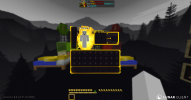
- Custom GUI (inventory/menu look)
- Custom hearts/hunger/XP bar
- Custom buttons across many PikaNetwork menus
- New sky
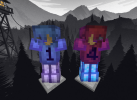
- Steve/Alex skins now wear a Pikachu hat
Notes
- This pack is made for PikaNetwork BedWars specifically.
- Some textures are inspired by other very popular packs, to allow for an easy switch for players used to other packs, but I edited everything to fit the same theme/style.
- If anything looks off or you find a missing texture, let me know, and I’ll update it.
Download
Pack Link: https://www.mediafire.com/file/smca3njt3f9otpi/!+++++§6§lPika§4§lBedwars.zip/fileVersion: 1.8.9
- Download the texture pack from the link above
- Launch Minecraft and ensure the game version matches the texture pack's compatibility (1.8.9)
- From the main menu, click on Options
- Select Resource Packs from the options menu
- Click on Open Pack Folder at the bottom left. This will open the resourcepacks directory on your computer
- Copy the downloaded .zip file and paste it into the resourcepacks folder
- Return to the Resource Packs menu in Minecraft. The new texture pack should now appear in the left column
- Hover over the texture pack and click the arrow pointing right to move it to the "Selected" column
- Ensure the new texture pack is positioned above the default textures in the "Selected" column
- Click Done to apply the texture pack. Minecraft will reload, and the new textures will be activated
Feedback
If you try it out, I’d appreciate any feedback, especially if you have ideas for more BedWars items with a Pokémon theme I could implement.Thanks for checking it out!


