

Mefity
Donator
- Joined
- Dec 3, 2024
- Messages
- 1,899
- Points
- 78
- IGN
- Mefity

Sometimes, players in PikaNetwork may find themselves in challenging situations and might not know how to proceed. In this thread, I will outline various scenarios you may encounter and provide guidance on what to do in each case. It's common for players to feel uncertain about their next steps in these situations, so I hope this helps. This thread is based on my experiences with players seeking help. If you find yourself in a situation that is not covered in this thread, I recommend creating a support ticket (HERE). This is the most effective way to get assistance from the dedicated staff team. Alternatively, you can send a message in the Discord #Community-help channel. However, please note that the help provided there is NOT official and may be misleading.
► Payment-related Situations:
If you made a purchase from the store or within the game and have not yet received your item, and the payment has been processed, your next step is to create a Payment-related ticket. This will notify the server owners about the issue you encountered with your payment, whether it involves Pika's Gold or real money. You can find the ticket [HERE]. Note that the ticket might take some time to be handled. There is no estimated time for when it might be handled, so please do not go to #community-help or DM staff members to handle your ticket because they cannot.
► Account's password situations:
If you ever forget your PikaNetwork server password, here's what you need to do:
**Method 1: Using the /resetpassword Command**
When you join and reach the login area, enter the command `/resetpassword`.IMPORTANT: You must have linked your account to your email; otherwise, this method will not work. After entering the command, a message will be sent to your email (please check your Spam folder if you don't see it in your inbox). Follow the instructions in the email to change your password to a strong one that you won’t forget. Refer to this article to ensure your account is secure.
**Method 2: If You Haven't Linked Your Email**
If you did not link your account to an email, don’t worry you can still reset your password. You can create a password reset request on the forums to notify the Admins and the Manager that you need to reset your password. Follow the instructions and answer the questions in the request form, which you can find [HERE]. Please note that only Admins and the Manager handle password reset requests. Do not ask any staff members below the rank of Admin or Manager to review or handle your request, as they cannot assist you. For more information, please refer to this article. Be aware that there is no estimated time for when your request will be addressed, so I strongly advise linking your account to an email to make the process easier for you.
► Your staff application has been Denied:
If you're interested in applying for a staff position at PikaNetwork, and your application got denied, here's what to do, but before that, note that Staff applications are only reviewed by Senior Moderators, Admins, and the Manager. More information can be found [HERE].
It's important to note that you should not discuss your staff application with any staff members who hold ranks lower than those mentioned above, players, or Ex-staff members.
If your application is denied and you do not understand why, you can create a support ticket. An Admin or the Manager will then provide an explanation for the denial. Additionally, you cannot reapply for staff until one month has passed since the denial message. For further details, please refer to this article.
Keep in mind that this also applies to Media ranks applications. The distinction is that the Media ranks applications are managed by the Media Manager(s): @Leqdxr. For more information regarding Media ranks applications, please refer to this article.
Please keep in mind that the information also applies to team event applications. The key difference is that these applications are managed by the Event Managers: @Luckyint and @_ImSiwan. Additionally, team event applications are reviewed by the Event Coordinators: @notziny, @Aeqlian, @notMadMax, and @Patolunix. For more details on how to apply for team events, please refer to the article provided.
► You are not able to join the server:
► You are trying to connect to the server, but you fail to do so, and the following messages show up when you try to connect.
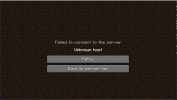
► Unknown host appears when you are trying to join a server, but the IP address you provided does not exist. To fix this, just make sure you are using the correct PikaNetwork IP address, which is: play.pika-network.net. Making sure that the IP is correct should fix this instantly.
► VPN Blockage

This message can appear in two situations. The first is an IP conflict. I won’t go into the details of IP conflicts since they are not crucial at the moment. Essentially, this occurs when you attempt to join the server without using a VPN. While this isn’t very common, it is possible.
The second situation arises when you are trying to connect to the server using a VPN.
Both of these issues can be resolved by submitting an appeal on the forums [HERE]. Please follow the prompts and answer the questions honestly.
► Punishment:
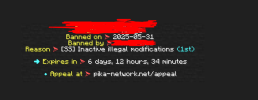
This message indicates that you are banned from the server. A ban occurs when you break a rule, and the punishment for that rule is a ban. However, this message may also appear due to an IP conflict. To determine if your ban is due to an IP conflict, visit the Punishment page, search for your name, and review your punishments. If you see that you have not been punished, then the issue is likely an IP conflict.
If someone in your household has been IP-banned, you will receive this message as well, and there is nothing you can do about it since you share the same IP address.
To resolve these issues, please appeal your situation HERE.
► Error messages:
- Disconnected:
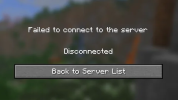
The causes of this error are numerous and varied, essentially, it could stem from a wide range of issues. In here, I will outline the most common causes that most likely will cause f this error.
1- Internet / Network Problems: Unstable connection, frequent drops, high latency, or packet loss. Weak Wi-Fi signal or interference.
2- Firewalls / Security Software: Firewall or antivirus software blocking the connection security settings can stop Minecraft from exchanging data properly. So make sure to disable your antivirus if it's on before trying to connect to the server.
3- Server-Side Issues: Server overload or high traffic
These are the most common causes of this error.
► Denied player report:
You found a player breaking a rule and decided to help make the community cleaner by reporting them, but your report was denied. Here's what to do:
First, read the denial reason provided by the staff member. If you believe the denial was unjust, reach out to the staff member who denied your report and ask them to explain their decision. If you don’t receive a response or if you don’t understand their explanation, create a support ticket. Higher staff members will review the situation and determine whether the denial reason was valid.
I have made an effort to cover most situations that players might encounter and explained how to handle them as best as I can. However, I may have forgotten some scenarios. If you notice anything that should be included in this thread, please DM me, and I will add it.
In general, I encourage everyone to read and understand the rules, as this will help you avoid any punishments. If you need assistance with any matters, please don't hesitate to contact me personally; I'm always happy to help. My Discord information is provided below. For official support, please create a support ticket.
I hope this thread proves useful for both current and new players of PikaNetwork.
Last edited:


