

- Joined
- Aug 8, 2019
- Messages
- 2,515
- Points
- 124

OneBlock is a competitive gamemode focused on island progression. Your journey begins with a single regenerating block. Break it to gather resources for building, expanding your island, and unlocking exciting new rewards. In this guide, you will have everything you need to know to start your adventure and grow your island on OneBlock, alongside some tips and tricks.

1. Exploring Island and Spawn
Once you log in to OneBlock for the first time, you will find yourself on your OneBlock. You can use the command /spawn to get teleported to the spawn area with helpful NPCs, crates, a PvP zone, and a portal that takes you back to your island. You can use /is go to return to your island.2. Create Your Island
Type /is create to generate your own island centered on a single regenerating block. Every time you mine this block, you will get new resources to expand and decorate your island. As you progress, the block changes to provide you with more advanced and better materials and mobs.- In OneBlock, even if you fall off your island, you won't die or lose any of your items, which means you can freely explore without worrying about losing your progress!
3. Playing with friends (adding new members)
You can invite a player (friend) to your island by using /is invite <username> 1. Ensure the player you invite leaves their current island. Before they join your island, they have to leave their existing one. This can be done by /is leave or if they play alone, /is disband (NOTE: This will permanently delete their island)
2. Send an invite: Use /is invite <username> to send an invite to them.
They can accept by either clicking on the notification in the chat or by typing /is accept <username>
3. Manage the roles and permissions of your members. Once new members join your island, they will be assigned the default role "Island Member". You can adjust their role by using /is promote <username> or /is demote <username>. To view and configure island permissions for each role, use /is permissions or
/is settings
2. Send an invite: Use /is invite <username> to send an invite to them.
They can accept by either clicking on the notification in the chat or by typing /is accept <username>
3. Manage the roles and permissions of your members. Once new members join your island, they will be assigned the default role "Island Member". You can adjust their role by using /is promote <username> or /is demote <username>. To view and configure island permissions for each role, use /is permissions or
/is settings
OneBlock Island Roles:
1. Recruit
2. Member (default)
3. Moderator
4. Admin
5. Co-Owner
4. Island Phases
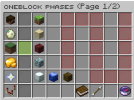
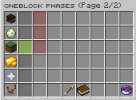
There is a total of 31 phases you can advance through. Each phase brings new resources and mobs that make every milestone feel rewarding. To reach the next phase, simply keep mining the regenerating block! If you need specific resources, you can switch phases, which are unlocked with /phase
1. Type /phase
2. Find the phase you need
3. Shift+Click on the phase
4. If it was done successfully, you will see this message in chat:

2. Find the phase you need
3. Shift+Click on the phase
4. If it was done successfully, you will see this message in chat:
- For faster advancement through phases, invite more people to your island. Teamwork makes the dream work! You can assign each player to mine 500 blocks a day (if you have 10 members, that's 5000 blocks broken per day).
- Use an appropriate tool for each block type instead of defaulting to a pickaxe to mine everything (stone, wood, gravel,...)
- Another thing that can make this easier is having 2 players mining that block at the same time. Player 1 uses a pickaxe, and Player 2 uses an axe. In this way, you don't have to think of switching between tools.
5. Repairing tools and gear
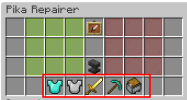
If you find yourself in a situation where your armor or tools are close to breaking, you can use /repairer to repair the item and keep grinding.1. Type /repairer - this GUI will pop up
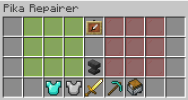
2. Click on the item/gear in your inventory that needs repairing (example: pickaxe)
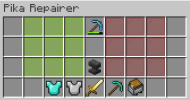
3. Click on ACCEPT (green) to fix the item - you will have to give exp to repair or click on DECLINE (red)
4. You can also use these "marked" tools to fix a specific set of gear to save time (so you don't have to do /repairer for each item - very useful when it comes to fixing armor sets and all tools.
2. Click on the item/gear in your inventory that needs repairing (example: pickaxe)
3. Click on ACCEPT (green) to fix the item - you will have to give exp to repair or click on DECLINE (red)
4. You can also use these "marked" tools to fix a specific set of gear to save time (so you don't have to do /repairer for each item - very useful when it comes to fixing armor sets and all tools.

Another activity you can do while expanding your island is completing /levels. There are total of 100 levels, which give many cool and useful rewards for your hard work. There are 2 types of rewards:
- Normal rewards - free for everyone
- Premium rewards - You need a premium-level pass to claim these rewards. You can purchase it from /goldshop.
Besides levels, you can get some nice rewards just by playing (being online)! Use command /playtimerewards or /ptr to claim this rewards.

Collections, Mobs, and Spawners
You can unlock and progress through seven different collections with various mobs to defeat. All the way from farming animals to high-level bosses. Each collection brings higher tier spawner that will increase your island (OneBlock) value and earning amount. Use /collections to view them and to view your current progress.BASIC Collection (pig, rabbit, chicken, sheep, cow)
WILD Collection (panda, zombie, skeleton, spider, creeper)
WATER Collection (dolphin, glow squid, squid, guardian, drowned)
NETHER Collection (blaze, zoglin, ghast, hoglin, piglin brute)
AIR Collection (parrot, allay, bee, phantom, llama)
GREAT Collection (enderman, silverfish, iron golem)
BOSS Collection (Evoker, Ravager, Warden)
WILD Collection (panda, zombie, skeleton, spider, creeper)
WATER Collection (dolphin, glow squid, squid, guardian, drowned)
NETHER Collection (blaze, zoglin, ghast, hoglin, piglin brute)
AIR Collection (parrot, allay, bee, phantom, llama)
GREAT Collection (enderman, silverfish, iron golem)
BOSS Collection (Evoker, Ravager, Warden)
/collections - GUI
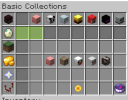
You can view your collection level by hovering over it:
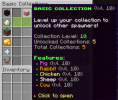
You can check the progress of your specific mob by hovering over it.
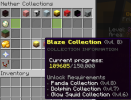
Besides that, you can also see the requirements of what you have to grind to unlock a new spawner or collection:
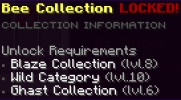
You can view your collection level by hovering over it:
You can check the progress of your specific mob by hovering over it.
Besides that, you can also see the requirements of what you have to grind to unlock a new spawner or collection:
Level 1: 10
Level 2: 25
Level 3: 250
Level 4: 500
Level 5: 1,000
Level 6: 3,500
Level 7: 10,000
Level 8: 50,000
Level 9: 150,000
Level 10: 500,000
Level 2: 25
Level 3: 250
Level 4: 500
Level 5: 1,000
Level 6: 3,500
Level 7: 10,000
Level 8: 50,000
Level 9: 150,000
Level 10: 500,000

Money and MobCoins

1. Mobcoins
Mobcoins can be collected by grinding mobs. You can exchange them in /ms or /transfer.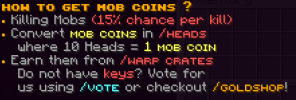
2. Money
Money can be earned by selling mobdrops, crops, and blocks. Making money in the game isn't easy, so it can take time. A small tip for making money would be if you build a somewhat big or even small farm, and you don't plan on grinding, turn that farm into an AFK farm.
To see all pets, use the command /pets. Currently, 7 pets are obtainable from crates (the rarity of the pet depends on the crate). Some pets, such as common pets, are in a unique crate, some rare pets are in a godly crate, and legendary pets are in a seasonal crate.
Ragnarok Pet - increases your DMG % to bosses
Bombshell Pet - Applies weakness to all enemies in X - block radius for X - duration in seconds
Nuke Pet - Gives you strength and swiftness for X duration in seconds
Cyborg Pet - Boosts your earned money by 1.5x / 2.0x / 2.5x for 2 minutes.
Flash Pet - Gives you the swiftness effect
Superman Pet - Gives you strength 2 for 7 seconds
Batman Pet - Boosts your earned experience by 1.5x / 2.0x / 2.5x for 2 minutes
Bombshell Pet - Applies weakness to all enemies in X - block radius for X - duration in seconds
Nuke Pet - Gives you strength and swiftness for X duration in seconds
Cyborg Pet - Boosts your earned money by 1.5x / 2.0x / 2.5x for 2 minutes.
Flash Pet - Gives you the swiftness effect
Superman Pet - Gives you strength 2 for 7 seconds
Batman Pet - Boosts your earned experience by 1.5x / 2.0x / 2.5x for 2 minutes

The top 3 islands in /is top with the highest island value will get rewards for their effort. During the entire season, there are total of 6 payouts.
- First Payout
- Second Payout
- Third Payout
- Fourth Payout
- Fifth Payout
- Final Payout
This is the amount of Pika Iron by each payout:
1st Place - 2,500 Pika Iron
2nd Place - 1,500 Pika Iron
3rd Place - 500 Pika Iron
2nd Place - 1,500 Pika Iron
3rd Place - 500 Pika Iron
1st Place - 3,000 Pika Iron
2nd Place - 2,000 Pika Iron
3rd Place - 750 Pika Iron
2nd Place - 2,000 Pika Iron
3rd Place - 750 Pika Iron
1st Place - 3,750 Pika Iron
2nd Place - 2,500 Pika Iron
3rd Place - 1,250 Pika Iron
2nd Place - 2,500 Pika Iron
3rd Place - 1,250 Pika Iron
1st Place - 4,500 Pika Iron
2nd Place - 3,000 Pika Iron
3rd Place - 1,750 Pika Iron
2nd Place - 3,000 Pika Iron
3rd Place - 1,750 Pika Iron
1st Place - 5,500 Pika Iron
2nd Place - 3,750 Pika Iron
3rd Place - 2,500 Pika Iron
2nd Place - 3,750 Pika Iron
3rd Place - 2,500 Pika Iron
1st Place - 25,000 Pika Iron
2nd Place - 17,500 Pika Iron
3rd Place - 10,000 Pika Iron
2nd Place - 17,500 Pika Iron
3rd Place - 10,000 Pika Iron
At last, I will leave you some of the frequently asked questions and a list of some helpful commands that I may have forgotten to mention.
List of useful commands:
- /help - opens GUI with guide/explanation of commands.
- /is help - shows the list of helpful commands related to the island.
- /ah help - shows the list of helpful commands related to an auction house.
- /cf help - shows the list of helpful commands related to a coinflips.
- /mobcoins - shows all mobcoins-related help.
- /maildelivery help - shows the maildelivery-related information.
Frequently Asked Questions (FAQ):
1. How to invite a friend to play with me?
- Use /is invite <username>
2. How to buy spawners?
- To buy spawners, use /spawners
3. Why can't I buy a "specific" spawner?
- Check if you have unlocked it in /collections. You need to meet all the requirements to buy specific spawners.
4. My mobs (pig/cow/sheep/panda/chicken/rabbit/squids) aren't spawning?
- Pig, Cow, Sheep, Chicken, Rabbit need at least one grass block around.
- Panda and Llama need 3x3 grass block to spawn.
- Glow squids need to be placed on Y:22 and surrounded by water around it (like a water box).
- Dolphin, Squid, Guardian, and Drowned need water around them.
5. How to vote?
- Use /vote.
6. If I fall in void, will I lose my items?
- No.
7. Can I return to the previous phase that had wood (or any other specific block?
- Yes, you can return to ANY phase you have unlocked. NOTE: that mining in the previous phase will not increase the current phase progress!! Remember to change back to your current phase once you are done. You can find the guide with step-by-step instructions above in the section:
"GETTING STARTED - 4. Island Phases".
8. How can I break spawners?
- To break spawners, you will need a silktouch voucher or a Knight+ rank.
9. Will I lose my items in the PvP Zone?
- Yes. Item drop is enabled in the PvP Zone, and you will lose items if you die there.
10. Can I sell items in auctionhouse without giving 5 gold as tax?
- No.
11. How to get the warlord sword?
- You can get this sword from a seasonal crate.
12. Who will get the payout on my island?
- The island leader will receive the payout.
- Use /is invite <username>
2. How to buy spawners?
- To buy spawners, use /spawners
3. Why can't I buy a "specific" spawner?
- Check if you have unlocked it in /collections. You need to meet all the requirements to buy specific spawners.
4. My mobs (pig/cow/sheep/panda/chicken/rabbit/squids) aren't spawning?
- Pig, Cow, Sheep, Chicken, Rabbit need at least one grass block around.
- Panda and Llama need 3x3 grass block to spawn.
- Glow squids need to be placed on Y:22 and surrounded by water around it (like a water box).
- Dolphin, Squid, Guardian, and Drowned need water around them.
5. How to vote?
- Use /vote.
6. If I fall in void, will I lose my items?
- No.
7. Can I return to the previous phase that had wood (or any other specific block?
- Yes, you can return to ANY phase you have unlocked. NOTE: that mining in the previous phase will not increase the current phase progress!! Remember to change back to your current phase once you are done. You can find the guide with step-by-step instructions above in the section:
"GETTING STARTED - 4. Island Phases".
8. How can I break spawners?
- To break spawners, you will need a silktouch voucher or a Knight+ rank.
9. Will I lose my items in the PvP Zone?
- Yes. Item drop is enabled in the PvP Zone, and you will lose items if you die there.
10. Can I sell items in auctionhouse without giving 5 gold as tax?
- No.
11. How to get the warlord sword?
- You can get this sword from a seasonal crate.
12. Who will get the payout on my island?
- The island leader will receive the payout.
With this being said, this is the end of the OneBlock guide for now. If something changes soon, this will be updated. Furthermore, if you notice something is missing or could be useful for new (and old) players, feel free to msg me and suggest/ask on Discord (naicharmony) or ping me with a question related to this in PikaNetwork Discord #community-help
I hope this guide was helpful to you. If you are competing for the island (oneblock) top, I wish you the best of luck!
And most importantly don't forget to have fun playing! Enjoy!

Last edited:


